Showing posts with label General Help. Show all posts

Fix for Cannot recover key error in JAVA

This is how i fixed Cannot recover key error in JAVA while i was setting up an SSL configuration for one of the Application Servers. Following is the part of the exception that i noted in the error log of my app,I couldn't start my tomcat and  jboss servers because of the below error.

ERROR - Could not start server:java.security.UnrecoverableKeyException: Cannot recover key
java.io.IOException: !JsseListener: java.security.UnrecoverableKeyException: Cannot recover key
    at org.mortbay.jetty.security.SslSocketConnector.newServerSocket(SslSocketConnector.java:516)
    at org.mortbay.jetty.bio.SocketConnector.open(SocketConnector.java:73)
    at org.mortbay.jetty.AbstractConnector.doStart(AbstractConnector.java:283)
    at org.mortbay.jetty.bio.SocketConnector.doStart(SocketConnector.java:147)
    at org.mortbay.component.AbstractLifeCycle.start(AbstractLifeCycle.java:50)

I see there are lot of post in google, but hard to find the exact solution, here it goes.

What causes this SSL error?
 
The answer is simple, the passwords of the Certificate Key and the generated keystore are different, they cannot be different and they should be same.If your certificate cer/crt/pfx key has a password called hpanswers then your generated keystore file should also have a similar password called hpanswers, it cannot be different, so both the certificate key and the jks keystore file should have the same password.

You either need to regenerate the keystore with the same password as certificate key or change the password for both..Set the key password to be the same as keystore password, using the below java keytool command

The below is an example , here the certificate key password is oldpass and the key password is hpanswers, we are now changing they certificate key password to hpanswers

$ keytool -keypasswd -keystore test.jks -alias ssltest
Enter keystore password:  hpanswers
Enter key password for ssltesr: oldpass
New key password for ssltest:  hpanswers
Re-enter new key password for :  hpanswers

Following is some useful information i noted while i was solving this posted on globalsign

How to Fix "Cannot Recover Key" Error

The error “java.security.UnrecoverableKeyException: Cannot recover key” occurs when the keystore and keyEntry passwords are different. To resolve this issue, you must remove all traces of the past certificate and request the file.

You must generate a new keystore, keyEntry and CSR. You must also specify the same password for the keystore and the keyEntry.

Useful References to understand this issue better.
  1. java.io.IOException: Cannot recover key
  2.  Cannot recover key tomcat
  3. Fish Eye Server Error

Seagate Fix All Option Saved Hard Disk From Crashing

Exploring Seagate tools for Windows saved my Hard Drive from crashing and loosing all the data(though it backed it up).About last 15 days I was concerned with My Seagate Hard Drive Model: ST3500418AS, Seagate tools Basic Tests reported ShortDST-Fail error on my Hard Drive.Following is the part of the Error log.

Short DST - Started 5/9/2012 4:29:05 PM
Short DST - FAIL 5/9/2012 4:30:21 PM
SeaTools Test Code: A1E1CEEA
Short Generic - Started 5/9/2012 5:56:32 PM
Short Generic - Pass 5/9/2012 5:57:55 PM
Short DST - Started 5/9/2012 5:59:07 PM
Short DST - FAIL 5/9/2012 5:59:22 PM
SeaTools Test Code: A1E1CEEA
Short DST - Started 5/9/2012 6:25:14 PM
Short DST - FAIL 5/9/2012 6:25:29 PM
SeaTools Test Code: A1E1CEEA

Further, Seagate asked to run SeaToolsDOS223ALL(Seatools for DOS) which might fix the bad sectors on the drives or asked to return the disk to get a new replacement disk.Thought of giving (Seatools for DOS) a shot, burned the ISO image and started sea tools for windows through DOS, after My drive got detected , I am unable select the drive and perform the tests, Seatools For Dos, just hanged on me and unable to perform any actions and i thought of returning the drive for replacement 


Today morning, just before publishing this post, I had a Self test of the Drive again through Seatools For Windows, ShortDST Failed Again, I saw a option Called Fix All Fast, Fix All Long Option and went through Fix All Short, the Fix All Was successful! Curiously went and ran the Short DST again, Voila..Its unbelievable the Short DST Passed this time , I think the Seagate Fix All Option Fixed all the Bad sectors on My drive and saved the drive from crashing.

Fix All Fast - Pass 5/28/2012 8:51:17 AM
Short DST - Started 5/28/2012 8:53:56 AM
Short DST - Pass 5/28/2012 8:54:58 AM
Short Generic - Started 5/28/2012 8:55:36 AM
Short Generic - Pass 5/28/2012 8:56:59 AM
Short DST - Started 5/28/2012 8:59:13 AM
Short DST - Pass 5/28/2012 9:00:14 AM


I Used the version Sea Tools for Windows version 1.2.0.6, Model: ST3500418AS, Firmware Updated to CC49.

Hope you run the Fix All Fast, Fix All Long Options through seagate windows tolls if run through test drive failures.

Thanks
HP Answers

Microsoft Jscript Compilation Error Syntax Error Fix

Microsoft Jscript Compilation Error Syntax Error, I encountered this error most recently on Windows 7 Machine with IE 8 Installed and With Java JRE 1.6.31 Version.Below is the quick steps to Resolve the Microsoft Jscript Compilation Error Syntax Error on windows based systems.

The above Error is usually seen with a small window while trying to Launch any Java based Application which invoke Java in the system, In my case, I tried to Launch a Java Webstart Application which resulted in the  Microsoft Jscript Compilation Error Syntax Error.


Close all the Internet Explorer and Firefax Windows before you perform the below steps

Solution 1
  • Click Start
  • Control Panel
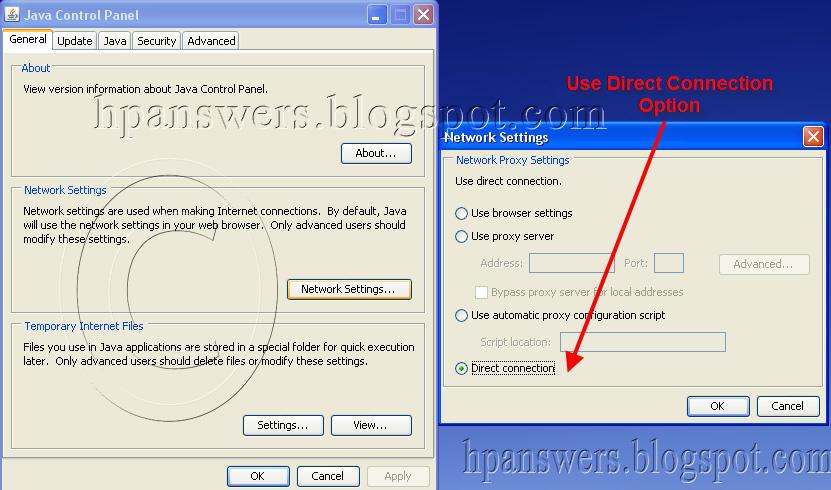
  • Double click on "Java" Icon (alternatively in Run Window, type the command: javaws -viewer)
  • You will have the Java Control Panel Opened
  • Click  On Network Settings Button
  • Select Direct connection instead of Use Browser Settings
  • Click on apply and OK

Now, try to Launch the Java Application and check if you are able to get Rid of  Syntax Error, Microsoft Jscript Compilation Error

Solution 2

The other solution is to un check the Use_Automatic_Script_Configuration in Lan Settings in Internet Explorer

  • Open Internet Explorer
  • Click on Tools-->Internet Options
  • Go To Connections TAB
  • Under the Lan Settings uncheck Use_Automatic_Script_Configuration check box if it is checked and also Automatically Detect Settings option.


One above two solutions should definitely fix/resolve the issue related to compilation error, discuss more about this solution using the below comments box.

Thanks
HP Answers

Launch Error: The Following Required Field Is Missing From the Launch File: JNLP

If you are encountering this Error: Application Error: Unable to launch the application, Launch file Error:The Following Required Field Is Missing From the Launch file: it is obvious that you trying to Launch a Java WebStart application through a JNLP(Java Network Launching Protocol)
 ..................................................................................
General
The following required field is missing from the launch file:
.....................................................
Exception
MissingFieldException[ The following required field is missing from the launch file: ]
at com.sun.javaws.jnl.xml.XMLFormat.parse(Unknown Source)
at com.sun.javaws.jnl.LaunchDescFactory.buildDescriptor(Unknown Source)
at com.sun.javaws.Main.main(Unknown Source)

First, I recommend to Download/Upgrade your Java Run Time Environment Version to the latest available from Oracle Website, Download Latest JRE.Check If you can Launch the Application now.

If you are still unable to Launch the application, I suggest you perform the following steps.


  • Click Start-
  • Control Panel
  • Double click on Java Icon
  • You will have the Java Control Panel Opened
  • Click On View Button On Temporary Internet Files Section
  • This will bring Up the List of Webstart Applications Installed on your machine
  • Right Click on Your Webstart Application and Click on Show JNLP file
  • Copy the Actual JNLP location from the JNLP window starting at href, http://........... to.jnlp
  • Following is the example
  • href="http://example.com/example.jnlp">
  • Paste the Link in the Internet Explorer and hit Enter, this will try to Launch your webstart application with out the Launch File Error
This should probably parse the JNLP properly and should resolve the issue.
If you are using java earlier versions of Java 7, try upgrading to latest version of Java 7
Alternatively, turn off your pop up blockers, antivirus and try to Launch the application again.

Hope the above information helps, discuss this post using the below comments section.

Thanks
HP Answers

Remove Blue Colour Shades Of Desktop Icons In XP Solution First On HP Answers

One or the other day, you might have observed your desktop Icons having blue color background behind the desktop Icons, this might be quite irritating if you are concerned about the desktop Look Up and likes to be clean.

I Feel Proud that I posted a Perfect solution to remove the blue color shades and background behind desktop Icons in Windows XP, this post has got a huge feedback about the solution which made many users to restore the Desktop Look Up to its Original, the Below is the Quick Link to access the Solution for removing blue background from desktop icons, HP Answers found this solution and posted this First on Web. on Monday, June 2, 2008

How To Remove Blue Color Background of Desktop Icons

I would Like to comment that there are Quite Number of Unique Solutions for the Problems Related to Digital Imaging solutions which are truly accepted by the ultimate users.

In addition, I would like to remind that HP Answers is Offering a Unique Design services a free of cost, from banner to wallpaper..its just free. You can Grab this using this Link

More such free solutions and free services are in pipeline for the benefit of web users for free cost.

Thanks
HP Answers

General Help From HP Answers Through A Quick Contact Form

Here is the Interesting Service From HP Answers, Question anything about your product,I will help you! Trouble finding right drivers for your product? No Problem! I will search and provide the Right Drivers Download Link For Your Product.

You Just need to fill out the below form, you will get the link to your e-mail, if you prefer Or you can view the download link in the comments section if asked.Please make a note that, i will only provide the links to the Official site of your product but not to the third party websites.

The main aim is to provide helpful solution and the right drivers for your products. You can also question about the availability of the updates and suggestions for buying new product and much through the below form, I will help you in every way I can within 4 hours, if i am not away.


Hope You Enjoy the Service!

Thanks
Its HP Answers